Jupyter Notebooks have been a popular technology in the Python data science community for a while now, especially in academics. Jupyter Notebooks are a way to mix inline, executable code with documentation in a presentation format. Best practices in organizing source code are not always the most efficient at communicating its functionality to a user.
While the intention of a programming language is the abstraction of computational complexity into a simplified language humans can read and write, they must always weigh toward the efficiency of the primary interpreter, the computer. Jupyter Notebooks are intended to communicate source code to humans first and computers second. We can use Jupyter Notebooks to communicate to humans not only the source but the interpreted result.
Jupyter can use a growing number of interpreters (called kernels) to run and render output, including my favorite, Golang.
Although data science expressed in Python is the first and most popular use of Jupyter Notebooks, I see a lot of other beneficial applications, including:
- Programming tutorials in a variety of languages.
- Coding Best practices and style guides.
- Technical articles and blogs.
- Leveraging static site generators like Jekyll and Hugo
Beyond the ability to execute code in-line, the most useful feature to me is exporting these notebooks as Markdown. Site builders like Jekyll and Hugo use Markdown to generate beautiful static websites and blogs.
§2026 Update
This still works. gophernotes is alive (around v0.7.5), Jupyter is thriving, and running Go in a notebook is the same good experience it was in 2018. A few setup details changed.
The install uses go install, not go get. Go deprecated go get for installing binaries in Go 1.16, and the current form pins a version:
go install github.com/gopherdata/[email protected]
The kernel files now live in the Go module cache instead of under ~/src. After installing, copy them into Jupyter and point the kernel at the binary (check the gophernotes README for the exact current steps, but the shape is):
mkdir -p ~/Library/Jupyter/kernels/gophernotes
cd ~/Library/Jupyter/kernels/gophernotes
cp "$(go env GOPATH)"/pkg/mod/github.com/gopherdata/[email protected]/kernel/* .
chmod +w ./kernel.json
You do not need Anaconda. The 2018 step below installs the full Anaconda distribution, but all you actually need is Jupyter, and Anaconda’s license now has strings attached for larger commercial use. pip install jupyterlab (or uv tool install jupyterlab) is enough, and jupyter lab is the modern interface; the classic jupyter notebook command now opens Notebook 7, which is built on JupyterLab.
One note on the Go sample below: it imports io/ioutil and calls ioutil.ReadAll, which was deprecated in Go 1.16. The drop-in replacement is io.ReadAll with import "io"; nothing else in the example changes.
And some housekeeping: this post was originally authored on a Jekyll site at mk.imti.co. The blog runs on Hugo at imti.co now, so the Jekyll and mk.imti.co references further down are historical.
Original article below. Everything from here down is the post as originally written. The 2026 Update above covers what’s changed since.
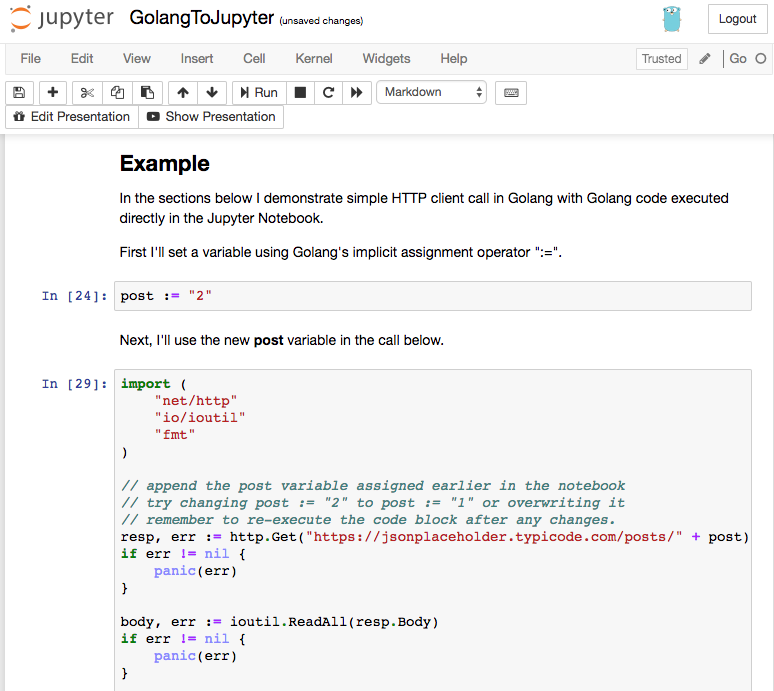
§Example
In the sections below I demonstrate a simple HTTP client call in Golang, with the Golang code executed directly in the Jupyter Notebook.
First I’ll set a variable using Golang’s implicit assignment operator “:=”.
post := "2"
Next, I’ll use the new post variable in the call below.
import (
    "net/http"
    "io/ioutil"
    "fmt"
)

// append the post variable assigned earlier in the notebook
// try changing post := "2" to post := "1" or overwriting it
// remember to re-execute the code block after any changes.
resp, err := http.Get("https://jsonplaceholder.typicode.com/posts/" + post)
if err != nil {
    panic(err)
}

body, err := ioutil.ReadAll(resp.Body)
if err != nil {
    panic(err)
}

fmt.Printf("Getting Post #%s\n", post)
fmt.Printf("Raw JSON: %s\n", body)
Getting Post #2
Raw JSON: {
  "userId": 1,
  "id": 2,
  "title": "qui est esse",
  "body": "est rerum tempore vitae\nsequi sint nihil reprehenderit dolor beatae ea dolores neque\nfugiat blanditiis voluptate porro vel nihil molestiae ut reiciendis\nqui aperiam non debitis possimus qui neque nisi nulla"
}


289 <nil>
If you are reading this article on https://mk.imti.co then what you see here was exported from Jupyter Notebooks on my Mac in the Markdown format and saved to Github repository for this site. https://mk.imti.co is a static website automatically generated by Github using Jekyll.
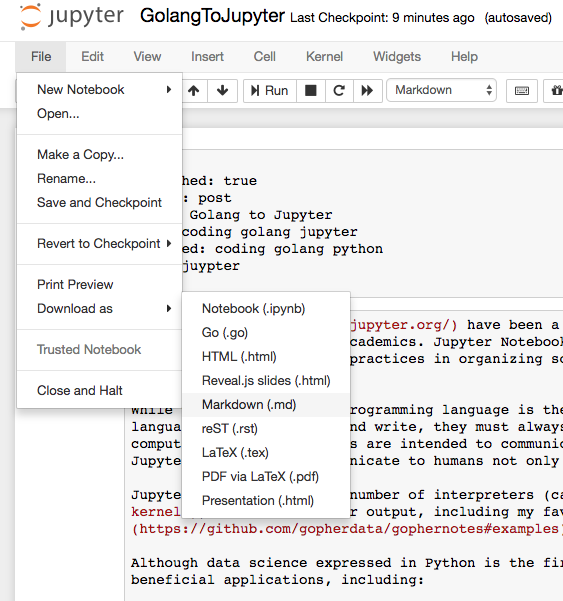
Although I could easily save this Notebook as HTML, site builders like Jekyll and Hugo use Markdown to transform the content into the structure and style of my site. Markdown along with a sitebuilder allows me to present the notebook in a format that fits my site. Other options include:
- providing the Notebook for download.
- linking to Jupyter’s nbviewer
- exported Markdown: 2018-06-10-golang-to-jupyter.md
- …and of course the page you are reading.
You can run, modify or extend this article in a Jupyter Notebook server on your local workstation.
§Getting Started with GO in Jupyter Notebooks
- Install the Anaconda package manager.
- Download Anaconda for Python 3.6 on Mac
- Install the gophernotes Golang kernel.
go get github.com/gopherdata/gophernotesmkdir -p ~/Library/Jupyter/kernels/gophernotescp ~/src/github.com/gopherdata/gophernotes/kernel/* ~/Library/Jupyter/kernels/gophernotes
NOTE: Your path to Go source may be $GOPATH/src and not ~/src/.
From a directory containing (or will contain) your notebooks, run:
jupyter notebook
This will fire up a Jupyter Notebooks server running on port 8888. You should be able to browse to http://localhost:8888/
You can test out the gophernotes Golang kernel by downloading and altering this article here.
§Resources
- Jupyter Notebooks Golang kernel: gophernotes
- Installing Jupyter Notebooks
- Jupyter Notebooks Documentation
- nteract - desktop application
- Markdown-Cheatsheet