kubefwd helps to enable a seamless and efficient way to develop applications and services on a local workstation. Locally develop applications that intend to interact with other services in a Kubernetes cluster. kubefwd allows applications with connection strings like http://elasticsearch:9200/ or tcp://db:3306 to communicate into the remote cluster. kubefwd can be used to reduce or eliminate the need for local environment specific connection configurations.
§2026 Update
The core idea below has not changed: forward a whole namespace of Kubernetes Services so your local code reaches them by their real names. The tool is on the CNCF Landscape now as an app development tool, has passed 4,100 stars on GitHub, and ships regular releases.
Installing is a one-liner everywhere. It is in Homebrew core, so on macOS it is just brew install kubefwd, no tap. Windows is fully supported now (the “not tested on Windows” note further down is long obsolete): winget install txn2.kubefwd or scoop install kubefwd, with Chocolatey also available. Linux still has .deb, .rpm, and .tar.gz builds on the releases page.
There is a TUI, a REST API, and an MCP server now. Add --tui and you get a live terminal dashboard of every forwarded service, its loopback IP, and its traffic, which is useful for a busy namespace. Add --api to drive and query kubefwd over HTTP from scripts. And the MCP server lets an AI assistant like Claude Code or Cursor list and control your forwards directly. None of these change the basic command; they sit on top of it.
It is also more stable: automatic reconnection when pods restart, pod log streaming, and holding up over long sessions. The command keeps the same shape, with svc as the short form and -E to preserve your environment so it finds your kubeconfig:
sudo -E kubefwd svc -n the-project --tui
The article continues below. The 2026 Update above covers what’s new; the walkthrough that follows has been refreshed where it matters, the install commands and Windows support.
Developing services in a Microservices architecture presents local development challenges, especially when the service you are developing needs to interact with a mixture of other services. Microservices, like any other applications are rarely ever self-contained and often need access to databases, authentication services, and other public or private APIs. Loosely-coupled applications still have couplings, they happen on a higher layer of the application stack and often through TCP networking.
§kubectl port-forward
The kubectl command offers a vast array of features for working with a Kubernetes cluster, one of which is the port-forward command. Forwarding one or more ports on your local workstation to a Kubernetes service, deployment or individual pod is a simple command. The kubectl port-forward was likely developed as a debugging utility and works great for that.
In most cases, it makes sense to port forward a Kubernetes Service. A Kubernetes Service can listen-on and forward to one or more ports of an associated Pod. Services are a persistent resource, as they provide a consistent way to reach a Pod. Pods can come and go, where Services persist and find the appropriate Pod when one is available.
The following is an example of a Kubectl port-forward command, forwarding port 8080 on the local workstation to 8080 for the service ok, additionally port 8081 on the local workstation to port 80 on ok service, in the Namespace the-project:
kubectl port-forward service/ok 8080:8080 8081:80 -n the-project
Access the Service through http://localhost:8081/ and http://localhost:8080/. Additional services can be port forwarded by back-grounding the command or opening new terminals and issuing more kubectl port-forward commands.
kubectl port-forward is convenient for quick one-off port forward access to Services, Deployments or directly to Pods in your cluster. Your application can use environment variables or configuration files along with scripts that set up all the required forwards to bootstrap your local app. However, I find this cumbersome. kubectl port-forward is great for debugging but falls a bit short for a development utility.
§kubefwd
kubefwd was developed as a command line utility to forward Kubernetes Services as they appear from within a Namespace. Running kubefwd allows you to access any Service from your local workstation just as you would from within another Pod in the same Namespace on the cluster.
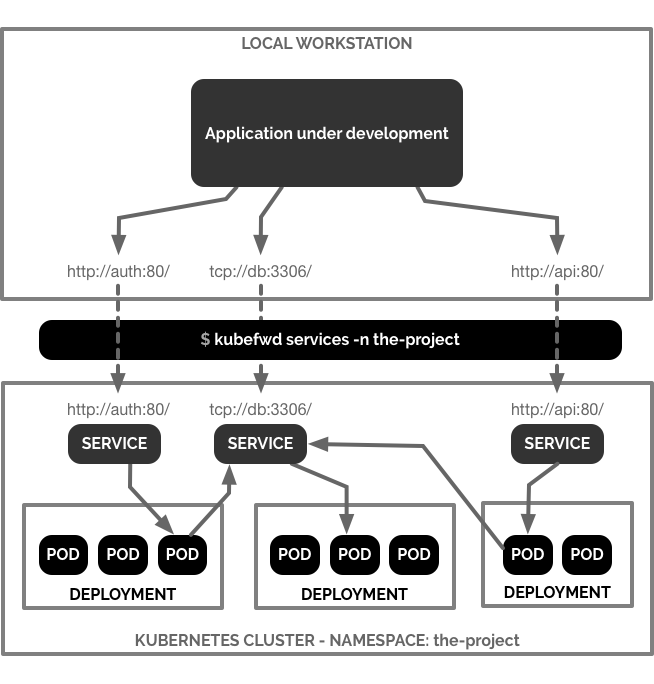
In the following example I forward services from the-project namespace:

The example above issues the following command:
sudo -E kubefwd svc -n the-project
sudo is required to allow kubefwd access to /etc/hosts on the local workstation. While kubefwd is running, DNS entries are temporarily placed in /etc/hosts, pointing all Service names found in the Namespace to the loopback network interface on the local workstation. sudo is also required to bind low port numbers, like port 80, on the loopback IP addresses kubefwd assigns on the workstation. If you don’t have administrator access to the local workstation or don’t wish to use sudo you can run kubefwd in a docker container. I go over specifics for Docker further down in this article.
After kubefwd begins forwarding Services from a Namespace they can be accessed directly on the local workstation. The example above illustrates using curl to call an HTTP Service called ok on port 80, followed by Elasticsearch on port 9200.
Local access to a Service named ok listening on port 80 in the-project Namespace on a remote Kubernetes cluster:
curl http://ok:80
Local access to a Service named elasticsearch listening on port 9200 in the-project Namespace on a remote Kubernetes cluster:
curl http://elasticsearch:9200
kubefwd gives each Service forward its own IP address, allowing multiple services to use the same port just as they may in the cluster. You might have a few services responding to port 80 or 8080 or have multiple databases like db-customer:3306 and db-auth:3306.
§Install kubefwd
§macOS
kubefwd is in Homebrew core, so installing on macOS is a one-liner with homebrew:
brew install kubefwd
§Linux
Check the kubefwd releases section on Github for pre-compiled binary distributions as .deb, .rpm, .snap and .tar.gz for Linux based operating systems or Docker containers.
§Windows
kubefwd is fully supported on Windows. Install it with winget or scoop:
winget install txn2.kubefwd
# or
scoop install kubefwd
§kubefwd in Docker
Add kubefwd to an existing docker container by installing it with one of the binary distributions found in the kubefwd releases on Github. You may also use the container txn2/kubefwd as the base container for another project.
The txn2/kubefwd is based on Alpine Linux and contains the kubefwd linux binary and the curl utility (optional). See the txn2/kubefwd source Dockerfile if you are curious.
kubefwd does not require kubectl to run. However kubefwd does require the kubectl configuration to connect to the cluster.
docker run --name fwd -it --rm \
    -v $HOME/.kube/config:/root/.kube/config \
    txn2/kubefwd services -n the-project
Test the running Docker container with its built-in curl command:
docker exec fwd curl -s http://ok
§Resources
kubefwd is an independent project not affiliated or endorsed by Kubernetes. I welcome any contributions to its development.
- kubefwd on Github
- kubectl port-forward command
- Setting up a Production Hobby Cluster
- Kubernetes Team Access - RBAC for developers and QA
- A Microservices Workflow with Golang and Gitlab CI
- Kubernetes FaaS - Kubeless Python and Elasticsearch
