kubefwd is a tool that bulk-forwards Kubernetes services to your local machine, making them accessible by their real hostnames. Instead of juggling kubectl port-forward commands, you run sudo kubefwd svc -n mynamespace and your app can connect to postgres:5432 or api:8080 as if those services were running locally. For full details on kubefwd’s features, see kubefwd in 2026: Interactive TUI and Auto-Reconnect.
This article focuses on kubefwd’s MCP integration, which lets AI assistants manage port forwarding on your behalf.
Why MCP for Development Tools?
MCP (Model Context Protocol) is a standard that lets AI assistants interact with external tools.
AI tools have taken software development to new levels of efficiency. Tools like Claude Code allow novices to develop impressive applications, and the technology is even more potent when harnessed by experienced professionals. More and more software will be written by, or heavily assisted by, AI, and that includes the tooling surrounding software development itself.
LLMs are good at writing code, but writing code is a small part of software development. Tools like kubefwd are specifically designed to make developing applications that rely on cluster services easier for the developer, and with MCP, easier for the developer and their AI assistant.
Consider implementing a new caching layer for your application. Your AI assistant can see that you have redis and authentication services running in the project namespace, forward them locally to their native hostnames and ports (redis:6379, auth:443), configure the new software with those natural endpoint addresses, test the connections, and explore pod logs for errors. All of this happens seamlessly, just by adding the kubefwd MCP to Claude Code or another MCP-capable agent.
What Your AI Can Do
With the kubefwd MCP, your AI assistant can:
- Discover services: List what’s running in your cluster namespaces
- Forward on demand: Start forwarding specific services or entire namespaces
- Stop forwarding: Remove forwards you no longer need
- Debug issues: Read pod logs and Kubernetes events
- Provide connection info: Give you the exact hostnames and ports to use
The AI understands runtime, not just code. It can see what’s actually deployed, what ports services expose, and configure your local development environment to match.
Examples
Claude Code
Here’s Claude Code with the kubefwd MCP helping develop a new notification service:
> Help me develop a new service in Python that will query the
  kfdemo database and send an email to each address in the
  database that has not yet received a notification.

⏺ I'll help you build that. Let me first see what services
  are available in the kfdemo namespace:

⏺ kubefwd:list_k8s_services (namespace: "kfdemo")
  ⎿  { "count": 4, "namespace": "kfdemo", ... }

⏺ You have a postgres database on port 5432 and an smtp
  service on port 2525. Let me forward those so you can
  develop locally:

⏺ kubefwd:add_service (namespace: "kfdemo", service_name: "postgres")
  ⎿  { "localIP": "127.1.27.3", "ports": [{"localPort": "5432" ... }

⏺ kubefwd:add_service (namespace: "kfdemo", service_name: "smtp")
  ⎿  { "localIP": "127.1.27.4", "ports": [{"localPort": "2525" ... }

⏺ Both services are now forwarded. Here's a configuration
  file for your Python service:

  # config.py
  DATABASE = {
      "host": "postgres",
      "port": 5432,
      ...
  }

  SMTP = {
      "host": "smtp",
      "port": 2525
  }

  Your code can now connect to postgres:5432 and smtp:2525
  using those exact hostnames, just like it would in production.
The AI discovered the available services, forwarded the ones needed for the task, and configured the application with the correct connection strings.
Claude Desktop
The same workflow works in Claude Desktop. Here a user asks Claude to forward services so their existing config.py can connect:
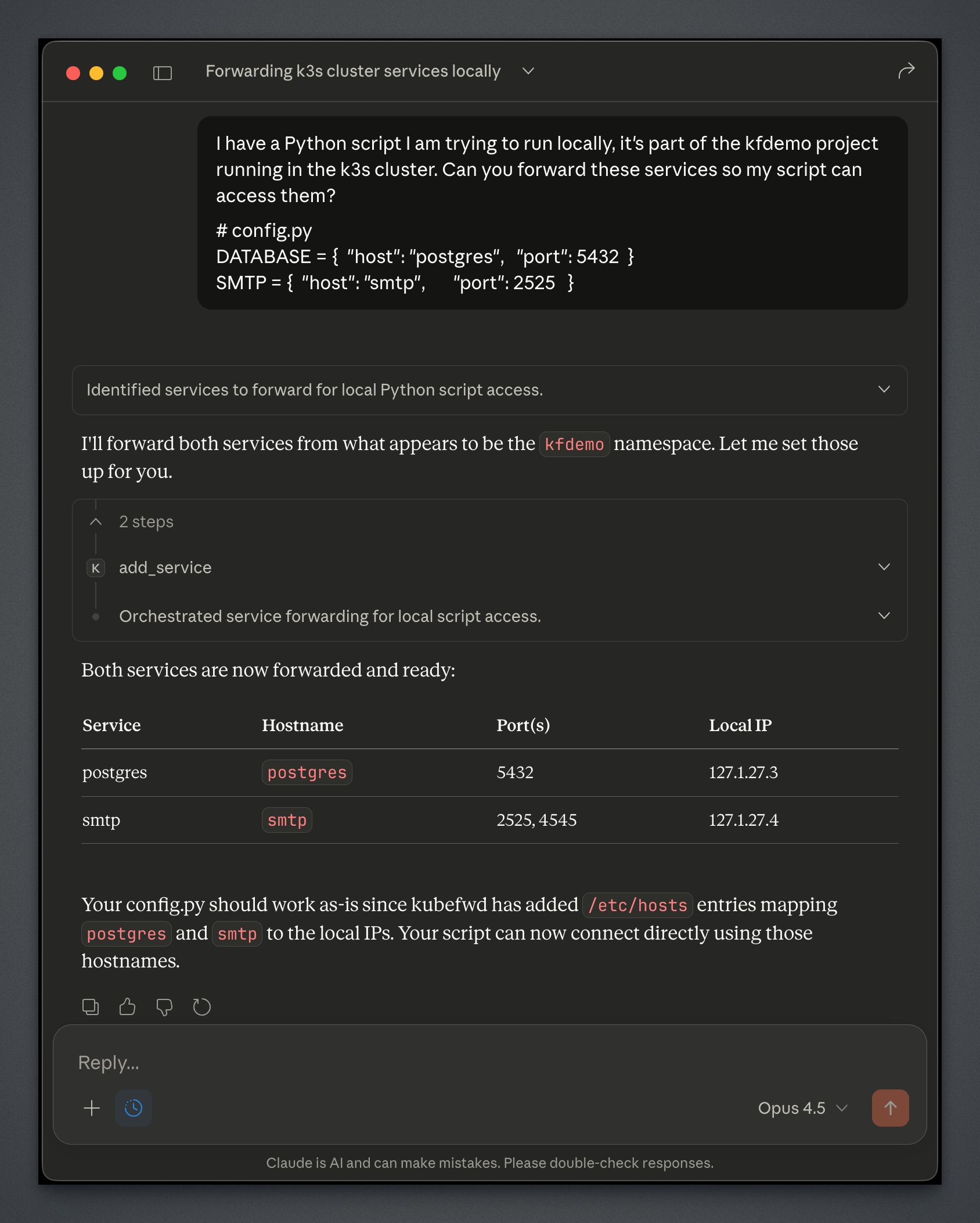
Claude identifies the services from the config file, forwards them from the kfdemo namespace, and confirms the /etc/hosts entries are in place. The user’s script works without any configuration changes.
Other MCP-Capable Tools
Any tool that supports MCP can use the kubefwd server. This includes Cursor, Windsurf, and other AI-assisted development environments. The setup process is similar: configure the MCP server and start kubefwd with the API enabled.
Setup
Claude Code
claude mcp add --transport stdio kubefwd -- kubefwd mcp
Claude Desktop
Download the .mcpb bundle for your platform from GitHub Releases and double-click to install.
Running kubefwd for MCP
After configuring MCP support, start kubefwd in a terminal:
sudo -E kubefwd --tui
I prefer running with the TUI so I can see what Claude is doing. The TUI shows services being added and removed as your AI manages them.
The --tui flag is optional. You can also run without it for a quieter experience:
sudo -E kubefwd
Both modes enable the REST API that the MCP server connects to.
How It Works
The MCP integration uses a two-process architecture:
- kubefwd runs with sudo and manages the actual port forwarding,
/etc/hostsentries, and network bindings - kubefwd mcp runs without sudo as a stdio-based MCP server that AI assistants spawn
The kubefwd mcp process connects to kubefwd’s REST API (at http://kubefwd.internal/api) to discover and control forwarding. This design lets AI assistants spawn the MCP server without requiring elevated privileges.
AI Assistant
    ↓ (stdio)
kubefwd mcp (no sudo)
    ↓ (HTTP)
kubefwd (sudo) → Kubernetes cluster
Quick Start
If you’re new to kubefwd, here’s the fast path:
Install (macOS):
brew install txn2/tap/kubefwd
Configure MCP (Claude Code):
claude mcp add --transport stdio kubefwd -- kubefwd mcp
Run kubefwd:
sudo -E kubefwd --tui
Now your AI assistant can manage Kubernetes service forwarding. Ask it to “forward the postgres service from namespace X” and watch it happen.
For the full feature guide including the interactive TUI, auto-reconnect, and REST API, see kubefwd in 2026: Interactive TUI and Auto-Reconnect.
Resources
This blog post, titled: "AI-Assisted Kubernetes Development with kubefwd: Let your AI assistant manage cluster connections" by Craig Johnston, is licensed under a Creative Commons Attribution 4.0 International License.
