This article begins a new series on linear algebra in Go, demonstrating how to perform numerical computations using the gonum library. If you’ve followed the Linear Algebra Crash Course in Python, this series provides a parallel implementation in Go with performance comparisons.
Linear Algebra: Golang Series - View all articles in this series.
Go offers advantages for linear algebra workloads: strong concurrency support, compile-time type checking, and excellent performance. The gonum ecosystem provides production-ready linear algebra, statistics, and plotting capabilities.
§2026 Update
Gonum is still the library for this, actively maintained and the right choice for linear algebra in Go. The code below still compiles and runs unchanged on current Go. One thing has changed: how you pull in the dependency.
These posts predate Go modules being universal. The go get gonum.org/v1/gonum/... wildcard is the old style. Today you work inside a module: run go mod init yourmodule once, add the gonum imports to your file, and run go mod tidy to fetch them and pin versions in go.mod. You rarely call go get by hand anymore; go mod tidy reads what you actually import and gets exactly that. Everything else, mat.VecDense, mat.Dot, the floats package, behaves the same.
The article continues below. The 2026 Update above covers what’s worth knowing today.
§Setting Up Gonum
Work inside a Go module. Initialize one, then let go mod tidy fetch gonum once you have added the imports:
go mod init example
go get gonum.org/v1/gonum
go get gonum.org/v1/plot
Import the necessary packages:
package main

import (
    "fmt"
    "math"

    "gonum.org/v1/gonum/floats"
    "gonum.org/v1/gonum/mat"
)
§Creating Vectors
In gonum, vectors are represented using mat.VecDense:
package main

import (
    "fmt"
    "gonum.org/v1/gonum/mat"
)

func main() {
    // Create a vector from a slice
    data := []float64{1.0, 2.0, 3.0, 4.0}
    v := mat.NewVecDense(len(data), data)

    fmt.Printf("Vector v:\n%v\n", mat.Formatted(v))
    fmt.Printf("Length: %d\n", v.Len())

    // Access individual elements
    fmt.Printf("v[0] = %.2f\n", v.AtVec(0))
    fmt.Printf("v[2] = %.2f\n", v.AtVec(2))
}
Output:
Vector v:
⎡1⎤
⎢2⎥
⎢3⎥
⎣4⎦
Length: 4
v[0] = 1.00
v[2] = 3.00
§Vector Operations
§Addition and Subtraction
func vectorAddition() {
    v1 := mat.NewVecDense(3, []float64{1, 2, 3})
    v2 := mat.NewVecDense(3, []float64{4, 5, 6})

    // Addition: result = v1 + v2
    result := mat.NewVecDense(3, nil)
    result.AddVec(v1, v2)
    fmt.Printf("v1 + v2 = %v\n", mat.Formatted(result.T()))

    // Subtraction: result = v1 - v2
    result.SubVec(v1, v2)
    fmt.Printf("v1 - v2 = %v\n", mat.Formatted(result.T()))
}
Output:
v1 + v2 = [5  7  9]
v1 - v2 = [-3  -3  -3]
§Scalar Multiplication
func scalarMultiplication() {
    v := mat.NewVecDense(3, []float64{1, 2, 3})
    scalar := 2.5

    // Scale the vector
    result := mat.NewVecDense(3, nil)
    result.ScaleVec(scalar, v)
    fmt.Printf("%.1f * v = %v\n", scalar, mat.Formatted(result.T()))
}
Output:
2.5 * v = [2.5 5 7.5]
§Dot Product
The dot product (inner product) of two vectors:
func dotProduct() {
    v1 := mat.NewVecDense(4, []float64{1, 2, 3, 4})
    v2 := mat.NewVecDense(4, []float64{2, 3, 4, 5})

    // Dot product
    dot := mat.Dot(v1, v2)
    fmt.Printf("v1 · v2 = %.2f\n", dot)

    // Manual calculation: 1*2 + 2*3 + 3*4 + 4*5 = 2 + 6 + 12 + 20 = 40
}
Output:
v1 · v2 = 40.00
§Vector Norms
The norm (magnitude) of a vector measures its length:
import "gonum.org/v1/gonum/floats"

func vectorNorms() {
    data := []float64{3, 4}
    v := mat.NewVecDense(2, data)

    // L2 norm (Euclidean)
    l2 := floats.Norm(data, 2)
    fmt.Printf("L2 norm: %.2f\n", l2)  // sqrt(3² + 4²) = 5

    // L1 norm (Manhattan)
    l1 := floats.Norm(data, 1)
    fmt.Printf("L1 norm: %.2f\n", l1)  // |3| + |4| = 7

    // Using mat.Norm
    l2Alt := mat.Norm(v, 2)
    fmt.Printf("L2 norm (mat): %.2f\n", l2Alt)
}
Output:
L2 norm: 5.00
L1 norm: 7.00
L2 norm (mat): 5.00
§Normalizing Vectors
Create a unit vector (length = 1):
func normalizeVector() {
    data := []float64{3, 4}
    v := mat.NewVecDense(2, data)

    // Compute norm
    norm := mat.Norm(v, 2)

    // Normalize
    normalized := mat.NewVecDense(2, nil)
    normalized.ScaleVec(1/norm, v)

    fmt.Printf("Original: %v\n", mat.Formatted(v.T()))
    fmt.Printf("Normalized: %v\n", mat.Formatted(normalized.T()))
    fmt.Printf("Norm of normalized: %.6f\n", mat.Norm(normalized, 2))
}
Output:
Original: [3  4]
Normalized: [0.6  0.8]
Norm of normalized: 1.000000
§Angle Between Vectors
The angle θ between vectors can be computed using the dot product:
func angleBetweenVectors() {
    v1 := mat.NewVecDense(2, []float64{1, 0})
    v2 := mat.NewVecDense(2, []float64{1, 1})

    // cos(θ) = (v1 · v2) / (||v1|| * ||v2||)
    dot := mat.Dot(v1, v2)
    norm1 := mat.Norm(v1, 2)
    norm2 := mat.Norm(v2, 2)

    cosTheta := dot / (norm1 * norm2)
    theta := math.Acos(cosTheta)
    thetaDegrees := theta * 180 / math.Pi

    fmt.Printf("Angle: %.2f radians (%.2f degrees)\n", theta, thetaDegrees)
}
Output:
Angle: 0.79 radians (45.00 degrees)
§Working with Raw Slices
Sometimes it’s more efficient to work with raw slices using the floats package:
import "gonum.org/v1/gonum/floats"

func sliceOperations() {
    a := []float64{1, 2, 3, 4}
    b := []float64{5, 6, 7, 8}

    // Element-wise operations modify in place
    result := make([]float64, len(a))
    copy(result, a)

    floats.Add(result, b)
    fmt.Printf("a + b = %v\n", result)

    // Dot product
    dot := floats.Dot(a, b)
    fmt.Printf("a · b = %.2f\n", dot)

    // Sum
    sum := floats.Sum(a)
    fmt.Printf("sum(a) = %.2f\n", sum)

    // Max
    max := floats.Max(a)
    fmt.Printf("max(a) = %.2f\n", max)
}
§Visualizing Vector Operations
One of Go’s strengths is the gonum/plot library for creating publication-quality visualizations. Here’s how to visualize vector addition:
package main

import (
    "image/color"
    "math"

    "gonum.org/v1/plot"
    "gonum.org/v1/plot/plotter"
    "gonum.org/v1/plot/vg"
)

func main() {
    p := plot.New()
    p.Title.Text = "Vector Addition"
    p.X.Label.Text = "X"
    p.Y.Label.Text = "Y"
    p.X.Min, p.X.Max = -1, 8
    p.Y.Min, p.Y.Max = -1, 8

    // Vectors: v1 = [3,2], v2 = [1,4], sum = [4,6]
    drawArrow(p, 0, 0, 3, 2, color.RGBA{R: 66, G: 133, B: 244, A: 255})   // v1 blue
    drawArrow(p, 0, 0, 1, 4, color.RGBA{R: 234, G: 67, B: 53, A: 255})    // v2 red
    drawArrow(p, 0, 0, 4, 6, color.RGBA{R: 52, G: 168, B: 83, A: 255})    // sum green

    p.Save(6*vg.Inch, 6*vg.Inch, "vectors.png")
}

func drawArrow(p *plot.Plot, x1, y1, x2, y2 float64, c color.Color) {
    // Line
    pts := plotter.XYs{{X: x1, Y: y1}, {X: x2, Y: y2}}
    line, _ := plotter.NewLine(pts)
    line.Color = c
    line.Width = vg.Points(2)
    p.Add(line)

    // Arrowhead
    angle := math.Atan2(y2-y1, x2-x1)
    arrowLen := 0.3
    for _, da := range []float64{math.Pi / 6, -math.Pi / 6} {
        ax := x2 - arrowLen*math.Cos(angle-da)
        ay := y2 - arrowLen*math.Sin(angle-da)
        arrow, _ := plotter.NewLine(plotter.XYs{{X: x2, Y: y2}, {X: ax, Y: ay}})
        arrow.Color = c
        arrow.Width = vg.Points(2)
        p.Add(arrow)
    }
}
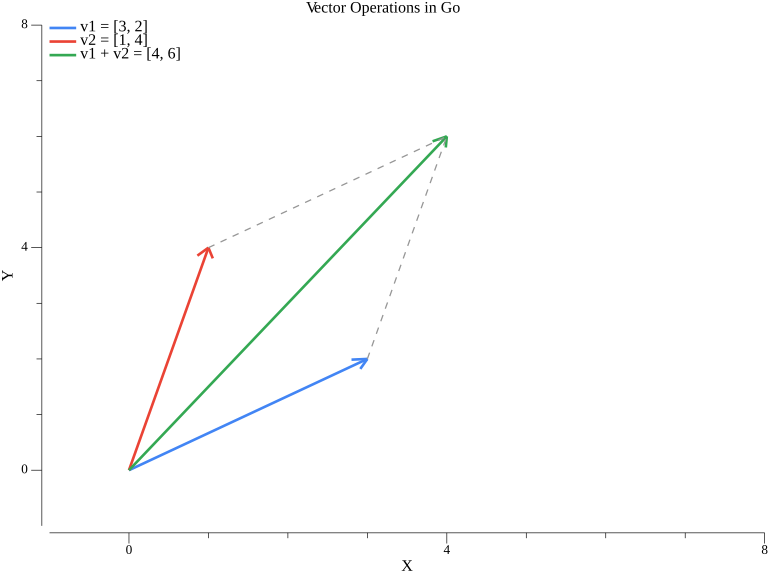
The blue vector v1=[3,2], red vector v2=[1,4], and their sum in green [4,6] form a parallelogram - a fundamental property of vector addition.
§Practical Example: Cosine Similarity
Cosine similarity is commonly used in NLP and recommendation systems:
func cosineSimilarity(v1, v2 *mat.VecDense) float64 {
    dot := mat.Dot(v1, v2)
    norm1 := mat.Norm(v1, 2)
    norm2 := mat.Norm(v2, 2)

    if norm1 == 0 || norm2 == 0 {
        return 0
    }
    return dot / (norm1 * norm2)
}

func cosineSimilarityExample() {
    // Word embeddings (simplified)
    king := mat.NewVecDense(4, []float64{0.5, 0.3, 0.8, 0.1})
    queen := mat.NewVecDense(4, []float64{0.5, 0.3, 0.7, 0.2})
    apple := mat.NewVecDense(4, []float64{0.9, 0.1, 0.1, 0.9})

    fmt.Printf("Similarity(king, queen) = %.4f\n",
        cosineSimilarity(king, queen))
    fmt.Printf("Similarity(king, apple) = %.4f\n",
        cosineSimilarity(king, apple))
}
Output:
Similarity(king, queen) = 0.9913
Similarity(king, apple) = 0.5101
§Complete Working Example
Here’s a complete program demonstrating all vector operations:
package main

import (
    "fmt"
    "math"

    "gonum.org/v1/gonum/floats"
    "gonum.org/v1/gonum/mat"
)

func main() {
    // Create vectors
    v1 := mat.NewVecDense(3, []float64{1, 2, 3})
    v2 := mat.NewVecDense(3, []float64{4, 5, 6})

    fmt.Println("=== Vector Operations in Go ===")
    fmt.Printf("v1 = %v\n", rawData(v1))
    fmt.Printf("v2 = %v\n", rawData(v2))

    // Addition
    sum := mat.NewVecDense(3, nil)
    sum.AddVec(v1, v2)
    fmt.Printf("v1 + v2 = %v\n", rawData(sum))

    // Dot product
    dot := mat.Dot(v1, v2)
    fmt.Printf("v1 · v2 = %.2f\n", dot)

    // Norms
    fmt.Printf("||v1|| = %.4f\n", mat.Norm(v1, 2))

    // Normalize
    norm := mat.Norm(v1, 2)
    unit := mat.NewVecDense(3, nil)
    unit.ScaleVec(1/norm, v1)
    fmt.Printf("unit(v1) = %v\n", rawData(unit))
    fmt.Printf("||unit(v1)|| = %.6f\n", mat.Norm(unit, 2))
}

func rawData(v *mat.VecDense) []float64 {
    data := make([]float64, v.Len())
    for i := 0; i < v.Len(); i++ {
        data[i] = v.AtVec(i)
    }
    return data
}
§Summary
This article covered:
- Setting up gonum for linear algebra in Go
- Creating vectors with
mat.VecDense - Vector operations: addition, subtraction, scalar multiplication
- Dot product using
mat.Dot - Vector norms (L1, L2)
- Normalizing vectors to unit length
- Angle computation between vectors
- Practical application: Cosine similarity
§Resources
Linear Algebra: Golang Series - View all articles in this series.