This article begins a new series on linear algebra in Go, demonstrating how to perform numerical computations using the gonum library. If you’ve followed the Linear Algebra Crash Course in Python, this series provides a parallel implementation in Go with performance comparisons.
Linear Algebra: Golang Series - View all articles in this series.
Go offers advantages for linear algebra workloads: strong concurrency support, compile-time type checking, and excellent performance. The gonum ecosystem provides production-ready linear algebra, statistics, and plotting capabilities.
Setting Up Gonum
First, install the gonum packages:
go get gonum.org/v1/gonum/...
go get gonum.org/v1/plot/...
Import the necessary packages:
package main

import (
    "fmt"
    "math"

    "gonum.org/v1/gonum/floats"
    "gonum.org/v1/gonum/mat"
)
Creating Vectors
In gonum, vectors are represented using mat.VecDense:
package main

import (
    "fmt"
    "gonum.org/v1/gonum/mat"
)

func main() {
    // Create a vector from a slice
    data := []float64{1.0, 2.0, 3.0, 4.0}
    v := mat.NewVecDense(len(data), data)

    fmt.Printf("Vector v:\n%v\n", mat.Formatted(v))
    fmt.Printf("Length: %d\n", v.Len())

    // Access individual elements
    fmt.Printf("v[0] = %.2f\n", v.AtVec(0))
    fmt.Printf("v[2] = %.2f\n", v.AtVec(2))
}
Output:
Vector v:
[1]
[2]
[3]
[4]
Length: 4
v[0] = 1.00
v[2] = 3.00
Vector Operations
Addition and Subtraction
func vectorAddition() {
    v1 := mat.NewVecDense(3, []float64{1, 2, 3})
    v2 := mat.NewVecDense(3, []float64{4, 5, 6})

    // Addition: result = v1 + v2
    result := mat.NewVecDense(3, nil)
    result.AddVec(v1, v2)
    fmt.Printf("v1 + v2 = %v\n", mat.Formatted(result.T()))

    // Subtraction: result = v1 - v2
    result.SubVec(v1, v2)
    fmt.Printf("v1 - v2 = %v\n", mat.Formatted(result.T()))
}
Output:
v1 + v2 = [5  7  9]
v1 - v2 = [-3  -3  -3]
Scalar Multiplication
func scalarMultiplication() {
    v := mat.NewVecDense(3, []float64{1, 2, 3})
    scalar := 2.5

    // Scale the vector
    result := mat.NewVecDense(3, nil)
    result.ScaleVec(scalar, v)
    fmt.Printf("%.1f * v = %v\n", scalar, mat.Formatted(result.T()))
}
Output:
2.5 * v = [2.5 5 7.5]
Dot Product
The dot product (inner product) of two vectors:
func dotProduct() {
    v1 := mat.NewVecDense(4, []float64{1, 2, 3, 4})
    v2 := mat.NewVecDense(4, []float64{2, 3, 4, 5})

    // Dot product
    dot := mat.Dot(v1, v2)
    fmt.Printf("v1 · v2 = %.2f\n", dot)

    // Manual calculation: 1*2 + 2*3 + 3*4 + 4*5 = 2 + 6 + 12 + 20 = 40
}
Output:
v1 · v2 = 40.00
Vector Norms
The norm (magnitude) of a vector measures its length:
import "gonum.org/v1/gonum/floats"

func vectorNorms() {
    data := []float64{3, 4}
    v := mat.NewVecDense(2, data)

    // L2 norm (Euclidean)
    l2 := floats.Norm(data, 2)
    fmt.Printf("L2 norm: %.2f\n", l2)  // sqrt(3² + 4²) = 5

    // L1 norm (Manhattan)
    l1 := floats.Norm(data, 1)
    fmt.Printf("L1 norm: %.2f\n", l1)  // |3| + |4| = 7

    // Using mat.Norm
    l2Alt := mat.Norm(v, 2)
    fmt.Printf("L2 norm (mat): %.2f\n", l2Alt)
}
Output:
L2 norm: 5.00
L1 norm: 7.00
L2 norm (mat): 5.00
Normalizing Vectors
Create a unit vector (length = 1):
func normalizeVector() {
    data := []float64{3, 4}
    v := mat.NewVecDense(2, data)

    // Compute norm
    norm := mat.Norm(v, 2)

    // Normalize
    normalized := mat.NewVecDense(2, nil)
    normalized.ScaleVec(1/norm, v)

    fmt.Printf("Original: %v\n", mat.Formatted(v.T()))
    fmt.Printf("Normalized: %v\n", mat.Formatted(normalized.T()))
    fmt.Printf("Norm of normalized: %.6f\n", mat.Norm(normalized, 2))
}
Output:
Original: [3  4]
Normalized: [0.6  0.8]
Norm of normalized: 1.000000
Angle Between Vectors
The angle θ between vectors can be computed using the dot product:
func angleBetweenVectors() {
    v1 := mat.NewVecDense(2, []float64{1, 0})
    v2 := mat.NewVecDense(2, []float64{1, 1})

    // cos(θ) = (v1 · v2) / (||v1|| * ||v2||)
    dot := mat.Dot(v1, v2)
    norm1 := mat.Norm(v1, 2)
    norm2 := mat.Norm(v2, 2)

    cosTheta := dot / (norm1 * norm2)
    theta := math.Acos(cosTheta)
    thetaDegrees := theta * 180 / math.Pi

    fmt.Printf("Angle: %.2f radians (%.2f degrees)\n", theta, thetaDegrees)
}
Output:
Angle: 0.79 radians (45.00 degrees)
Working with Raw Slices
Sometimes it’s more efficient to work with raw slices using the floats package:
import "gonum.org/v1/gonum/floats"

func sliceOperations() {
    a := []float64{1, 2, 3, 4}
    b := []float64{5, 6, 7, 8}

    // Element-wise operations modify in place
    result := make([]float64, len(a))
    copy(result, a)

    floats.Add(result, b)
    fmt.Printf("a + b = %v\n", result)

    // Dot product
    dot := floats.Dot(a, b)
    fmt.Printf("a · b = %.2f\n", dot)

    // Sum
    sum := floats.Sum(a)
    fmt.Printf("sum(a) = %.2f\n", sum)

    // Max
    max := floats.Max(a)
    fmt.Printf("max(a) = %.2f\n", max)
}
Visualizing Vector Operations
One of Go’s strengths is the gonum/plot library for creating publication-quality visualizations. Here’s how to visualize vector addition:
package main

import (
    "image/color"
    "math"

    "gonum.org/v1/plot"
    "gonum.org/v1/plot/plotter"
    "gonum.org/v1/plot/vg"
)

func main() {
    p := plot.New()
    p.Title.Text = "Vector Addition"
    p.X.Label.Text = "X"
    p.Y.Label.Text = "Y"
    p.X.Min, p.X.Max = -1, 8
    p.Y.Min, p.Y.Max = -1, 8

    // Vectors: v1 = [3,2], v2 = [1,4], sum = [4,6]
    drawArrow(p, 0, 0, 3, 2, color.RGBA{R: 66, G: 133, B: 244, A: 255})   // v1 blue
    drawArrow(p, 0, 0, 1, 4, color.RGBA{R: 234, G: 67, B: 53, A: 255})    // v2 red
    drawArrow(p, 0, 0, 4, 6, color.RGBA{R: 52, G: 168, B: 83, A: 255})    // sum green

    p.Save(6*vg.Inch, 6*vg.Inch, "vectors.png")
}

func drawArrow(p *plot.Plot, x1, y1, x2, y2 float64, c color.Color) {
    // Line
    pts := plotter.XYs{{X: x1, Y: y1}, {X: x2, Y: y2}}
    line, _ := plotter.NewLine(pts)
    line.Color = c
    line.Width = vg.Points(2)
    p.Add(line)

    // Arrowhead
    angle := math.Atan2(y2-y1, x2-x1)
    arrowLen := 0.3
    for _, da := range []float64{math.Pi / 6, -math.Pi / 6} {
        ax := x2 - arrowLen*math.Cos(angle-da)
        ay := y2 - arrowLen*math.Sin(angle-da)
        arrow, _ := plotter.NewLine(plotter.XYs{{X: x2, Y: y2}, {X: ax, Y: ay}})
        arrow.Color = c
        arrow.Width = vg.Points(2)
        p.Add(arrow)
    }
}
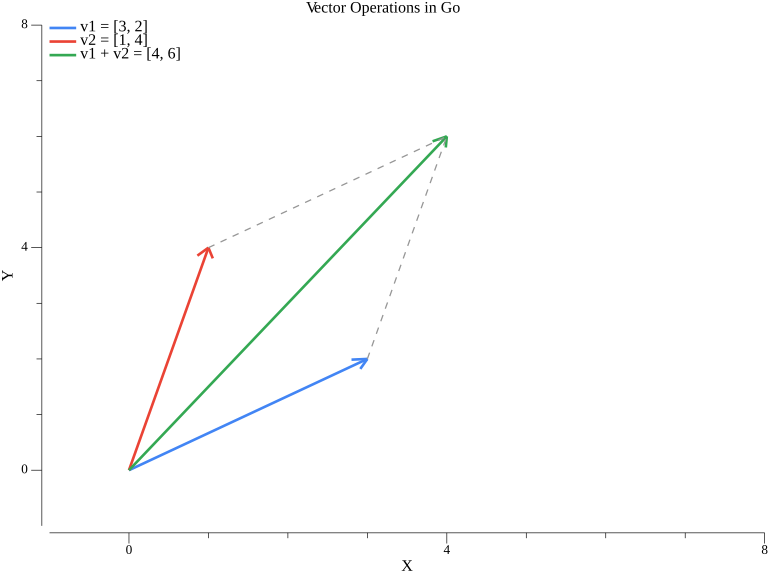
The blue vector v1=[3,2], red vector v2=[1,4], and their sum in green [4,6] form a parallelogram - a fundamental property of vector addition.
Practical Example: Cosine Similarity
Cosine similarity is commonly used in NLP and recommendation systems:
func cosineSimilarity(v1, v2 *mat.VecDense) float64 {
    dot := mat.Dot(v1, v2)
    norm1 := mat.Norm(v1, 2)
    norm2 := mat.Norm(v2, 2)

    if norm1 == 0 || norm2 == 0 {
        return 0
    }
    return dot / (norm1 * norm2)
}

func cosineSimilarityExample() {
    // Word embeddings (simplified)
    king := mat.NewVecDense(4, []float64{0.5, 0.3, 0.8, 0.1})
    queen := mat.NewVecDense(4, []float64{0.5, 0.3, 0.7, 0.2})
    apple := mat.NewVecDense(4, []float64{0.9, 0.1, 0.1, 0.9})

    fmt.Printf("Similarity(king, queen) = %.4f\n",
        cosineSimilarity(king, queen))
    fmt.Printf("Similarity(king, apple) = %.4f\n",
        cosineSimilarity(king, apple))
}
Output:
Similarity(king, queen) = 0.9824
Similarity(king, apple) = 0.5735
Complete Working Example
Here’s a complete program demonstrating all vector operations:
package main

import (
    "fmt"
    "math"

    "gonum.org/v1/gonum/floats"
    "gonum.org/v1/gonum/mat"
)

func main() {
    // Create vectors
    v1 := mat.NewVecDense(3, []float64{1, 2, 3})
    v2 := mat.NewVecDense(3, []float64{4, 5, 6})

    fmt.Println("=== Vector Operations in Go ===")
    fmt.Printf("v1 = %v\n", rawData(v1))
    fmt.Printf("v2 = %v\n", rawData(v2))

    // Addition
    sum := mat.NewVecDense(3, nil)
    sum.AddVec(v1, v2)
    fmt.Printf("v1 + v2 = %v\n", rawData(sum))

    // Dot product
    dot := mat.Dot(v1, v2)
    fmt.Printf("v1 · v2 = %.2f\n", dot)

    // Norms
    fmt.Printf("||v1|| = %.4f\n", mat.Norm(v1, 2))

    // Normalize
    norm := mat.Norm(v1, 2)
    unit := mat.NewVecDense(3, nil)
    unit.ScaleVec(1/norm, v1)
    fmt.Printf("unit(v1) = %v\n", rawData(unit))
    fmt.Printf("||unit(v1)|| = %.6f\n", mat.Norm(unit, 2))
}

func rawData(v *mat.VecDense) []float64 {
    data := make([]float64, v.Len())
    for i := 0; i < v.Len(); i++ {
        data[i] = v.AtVec(i)
    }
    return data
}
Summary
This article covered:
- Setting up gonum for linear algebra in Go
- Creating vectors with
mat.VecDense - Vector operations: addition, subtraction, scalar multiplication
- Dot product using
mat.Dot - Vector norms (L1, L2)
- Normalizing vectors to unit length
- Angle computation between vectors
- Practical application: Cosine similarity
Resources
Linear Algebra: Golang Series - View all articles in this series.
This blog post, titled: "Linear Algebra in Go: Vectors and Basic Operations: Linear Algebra in Go Part 1" by Craig Johnston, is licensed under a Creative Commons Attribution 4.0 International License.
