This article covers matrix fundamentals in Go using the gonum library: matrix creation, basic arithmetic operations, and common matrix manipulations.
Linear Algebra: Golang Series - View all articles in this series.
Previous articles in this series:
This continues from Part 1, linked above.
§2026 Update
The gonum matrix API here is unchanged. It still compiles and runs on current Go, and mat.Dense, Mul, Add, T, Trace, and the rest behave exactly as shown.
Two things worth knowing. mat.Formatted prints matrices with the rounded bracket characters you see in the output below (⎡ ⎣ and friends) and right-aligns the columns; that is gonum’s style, not your terminal. And on sparse matrices: gonum is built around dense storage and its sparse support is limited, so if you actually need to exploit sparsity in Go, that is one spot where the ecosystem is still thinner than NumPy and SciPy, and you will reach outside gonum for it.
The article continues below. The 2026 Update above covers what’s worth knowing today.
§Creating Matrices
Gonum’s mat.Dense is the primary matrix type:
package main

import (
    "fmt"
    "gonum.org/v1/gonum/mat"
)

func main() {
    // Create a 3x4 matrix from row-major data
    data := []float64{
        1, 2, 3, 4,
        5, 6, 7, 8,
        9, 10, 11, 12,
    }
    A := mat.NewDense(3, 4, data)

    fmt.Println("Matrix A (3x4):")
    fmt.Printf("%v\n", mat.Formatted(A, mat.Prefix("  ")))

    // Get dimensions
    rows, cols := A.Dims()
    fmt.Printf("Dimensions: %d x %d\n", rows, cols)

    // Access elements (0-indexed)
    fmt.Printf("A[1,2] = %.2f\n", A.At(1, 2))
}
Output:
Matrix A (3x4):
⎡ 1   2   3   4⎤
  ⎢ 5   6   7   8⎥
  ⎣ 9  10  11  12⎦
Dimensions: 3 x 4
A[1,2] = 7.00
§Special Matrices
§Identity Matrix
func identityMatrix() {
    // Create 4x4 identity matrix
    I := mat.NewDiagDense(4, []float64{1, 1, 1, 1})
    fmt.Println("Identity matrix:")
    fmt.Printf("%v\n", mat.Formatted(I))
}
§Zero Matrix
func zeroMatrix() {
    // Create 3x3 zero matrix
    Z := mat.NewDense(3, 3, nil)  // nil initializes to zeros
    fmt.Println("Zero matrix:")
    fmt.Printf("%v\n", mat.Formatted(Z))
}
§Diagonal Matrix
func diagonalMatrix() {
    // Create diagonal matrix
    diag := []float64{2, 3, 5, 7}
    D := mat.NewDiagDense(4, diag)
    fmt.Println("Diagonal matrix:")
    fmt.Printf("%v\n", mat.Formatted(D))
}
§Matrix Arithmetic
§Addition and Subtraction
func matrixAddition() {
    A := mat.NewDense(2, 2, []float64{1, 2, 3, 4})
    B := mat.NewDense(2, 2, []float64{5, 6, 7, 8})

    // Addition
    sum := mat.NewDense(2, 2, nil)
    sum.Add(A, B)
    fmt.Println("A + B:")
    fmt.Printf("%v\n", mat.Formatted(sum))

    // Subtraction
    diff := mat.NewDense(2, 2, nil)
    diff.Sub(A, B)
    fmt.Println("A - B:")
    fmt.Printf("%v\n", mat.Formatted(diff))
}
Output:
A + B:
⎡ 6   8⎤
⎣10  12⎦
A - B:
⎡-4  -4⎤
⎣-4  -4⎦
§Scalar Multiplication
func scalarMultiplication() {
    A := mat.NewDense(2, 3, []float64{1, 2, 3, 4, 5, 6})
    scalar := 2.5

    result := mat.NewDense(2, 3, nil)
    result.Scale(scalar, A)

    fmt.Printf("%.1f * A:\n", scalar)
    fmt.Printf("%v\n", mat.Formatted(result))
}
§Matrix Multiplication
func matrixMultiplication() {
    // A: 2x3
    A := mat.NewDense(2, 3, []float64{
        1, 2, 3,
        4, 5, 6,
    })

    // B: 3x2
    B := mat.NewDense(3, 2, []float64{
        7, 8,
        9, 10,
        11, 12,
    })

    // C = A * B (2x2)
    var C mat.Dense
    C.Mul(A, B)

    fmt.Println("A (2x3):")
    fmt.Printf("%v\n", mat.Formatted(A))
    fmt.Println("B (3x2):")
    fmt.Printf("%v\n", mat.Formatted(B))
    fmt.Println("A * B (2x2):")
    fmt.Printf("%v\n", mat.Formatted(&C))
}
Output:
A (2x3):
⎡1  2  3⎤
⎣4  5  6⎦
B (3x2):
⎡ 7   8⎤
⎢ 9  10⎥
⎣11  12⎦
A * B (2x2):
⎡ 58   64⎤
⎣139  154⎦
§Element-wise Operations
func elementWiseOperations() {
    A := mat.NewDense(2, 2, []float64{1, 2, 3, 4})
    B := mat.NewDense(2, 2, []float64{5, 6, 7, 8})

    // Element-wise multiplication (Hadamard product)
    result := mat.NewDense(2, 2, nil)
    result.MulElem(A, B)

    fmt.Println("A ⊙ B (element-wise):")
    fmt.Printf("%v\n", mat.Formatted(result))

    // Element-wise division
    result.DivElem(A, B)
    fmt.Println("A ⊘ B (element-wise division):")
    fmt.Printf("%v\n", mat.Formatted(result))
}
§Visualizing Matrix Transformations
Matrices represent linear transformations. Here’s how a matrix transforms the unit square:
package main

import (
    "image/color"

    "gonum.org/v1/gonum/mat"
    "gonum.org/v1/plot"
    "gonum.org/v1/plot/plotter"
    "gonum.org/v1/plot/vg"
)

func main() {
    p := plot.New()
    p.Title.Text = "Matrix Transformation"
    p.X.Min, p.X.Max = -1, 5
    p.Y.Min, p.Y.Max = -1, 4

    // Unit square vertices
    square := [][]float64{{0, 0}, {1, 0}, {1, 1}, {0, 1}, {0, 0}}

    // Transformation matrix
    A := mat.NewDense(2, 2, []float64{2, 1, 0.5, 1.5})

    // Original square (blue)
    origPts := make(plotter.XYs, len(square))
    for i, pt := range square {
        origPts[i] = plotter.XY{X: pt[0], Y: pt[1]}
    }
    origLine, _ := plotter.NewLine(origPts)
    origLine.Color = color.RGBA{R: 66, G: 133, B: 244, A: 255}
    origLine.Width = vg.Points(2)

    // Transformed square (red)
    transPts := make(plotter.XYs, len(square))
    for i, pt := range square {
        v := mat.NewVecDense(2, pt)
        var result mat.VecDense
        result.MulVec(A, v)
        transPts[i] = plotter.XY{X: result.AtVec(0), Y: result.AtVec(1)}
    }
    transLine, _ := plotter.NewLine(transPts)
    transLine.Color = color.RGBA{R: 234, G: 67, B: 53, A: 255}
    transLine.Width = vg.Points(2)

    p.Add(origLine, transLine)
    p.Save(6*vg.Inch, 5*vg.Inch, "matrix-transform.png")
}
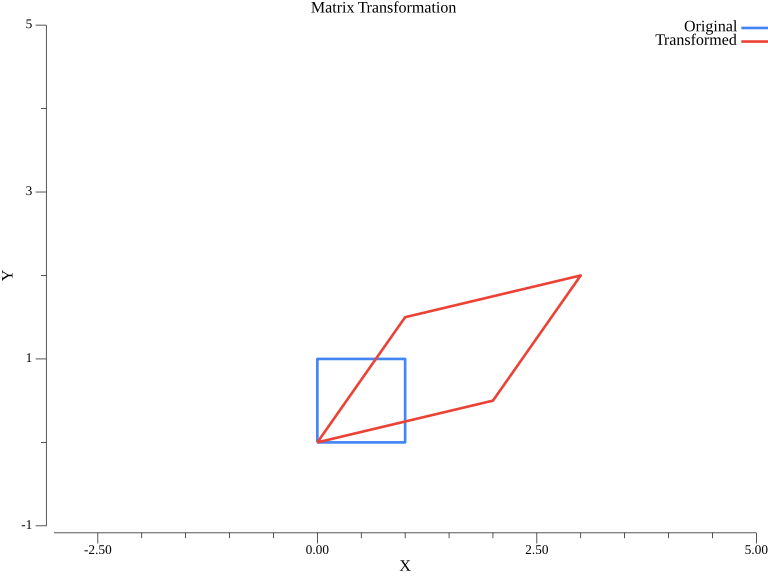
The blue unit square is transformed by matrix A into the red parallelogram. This visualizes how matrices stretch, shear, and rotate space.
§Matrix Transposition
func matrixTranspose() {
    A := mat.NewDense(2, 3, []float64{
        1, 2, 3,
        4, 5, 6,
    })

    // Transpose
    var AT mat.Dense
    AT.CloneFrom(A.T())

    fmt.Println("A:")
    fmt.Printf("%v\n", mat.Formatted(A))
    fmt.Println("A^T:")
    fmt.Printf("%v\n", mat.Formatted(&AT))

    // Note: A.T() returns a view, not a copy
    // Use CloneFrom for a separate matrix
}
Output:
A:
⎡1  2  3⎤
⎣4  5  6⎦
A^T:
⎡1  4⎤
⎢2  5⎥
⎣3  6⎦
§Matrix Slicing and Submatrices
func matrixSlicing() {
    A := mat.NewDense(4, 4, []float64{
        1, 2, 3, 4,
        5, 6, 7, 8,
        9, 10, 11, 12,
        13, 14, 15, 16,
    })

    fmt.Println("Original matrix A:")
    fmt.Printf("%v\n", mat.Formatted(A))

    // Extract a row
    row := A.RowView(1)  // Second row
    fmt.Printf("Row 1: %v\n", mat.Formatted(row.T()))

    // Extract a column
    col := A.ColView(2)  // Third column
    fmt.Printf("Column 2: %v\n", mat.Formatted(col))

    // Extract a submatrix (rows 1-2, cols 1-2)
    sub := A.Slice(1, 3, 1, 3).(*mat.Dense)
    fmt.Println("Submatrix [1:3, 1:3]:")
    fmt.Printf("%v\n", mat.Formatted(sub))
}
§Modifying Matrices
func modifyMatrix() {
    A := mat.NewDense(3, 3, nil)

    // Set individual elements
    A.Set(0, 0, 1)
    A.Set(1, 1, 2)
    A.Set(2, 2, 3)

    fmt.Println("After setting diagonal:")
    fmt.Printf("%v\n", mat.Formatted(A))

    // Set a row
    A.SetRow(0, []float64{7, 8, 9})
    fmt.Println("After setting row 0:")
    fmt.Printf("%v\n", mat.Formatted(A))

    // Set a column
    A.SetCol(2, []float64{10, 20, 30})
    fmt.Println("After setting column 2:")
    fmt.Printf("%v\n", mat.Formatted(A))
}
§Matrix Properties
func matrixProperties() {
    A := mat.NewDense(3, 3, []float64{
        1, 2, 3,
        4, 5, 6,
        7, 8, 9,
    })

    // Trace (sum of diagonal)
    trace := mat.Trace(A)
    fmt.Printf("Trace: %.2f\n", trace)

    // Sum of all elements
    sum := mat.Sum(A)
    fmt.Printf("Sum of all elements: %.2f\n", sum)

    // Frobenius norm
    frobNorm := mat.Norm(A, 2)
    fmt.Printf("Frobenius norm: %.4f\n", frobNorm)
}
Output:
Trace: 15.00
Sum of all elements: 45.00
Frobenius norm: 16.8819
§Sparse Matrices
For matrices with many zeros, use sparse representations:
import "gonum.org/v1/gonum/mat"

func sparseMatrixExample() {
    // Create a sparse matrix using DOK (Dictionary of Keys)
    // then convert to dense if needed
    data := map[int]map[int]float64{
        0: {0: 1, 2: 2},
        1: {1: 3},
        2: {0: 4, 2: 5},
    }

    // Create dense from sparse data
    A := mat.NewDense(3, 3, nil)
    for i, row := range data {
        for j, val := range row {
            A.Set(i, j, val)
        }
    }

    fmt.Println("Sparse matrix as dense:")
    fmt.Printf("%v\n", mat.Formatted(A))
}
§Complete Working Example
package main

import (
    "fmt"
    "gonum.org/v1/gonum/mat"
)

func main() {
    fmt.Println("=== Matrix Fundamentals in Go ===\n")

    // Create matrices
    A := mat.NewDense(2, 3, []float64{1, 2, 3, 4, 5, 6})
    B := mat.NewDense(3, 2, []float64{7, 8, 9, 10, 11, 12})

    fmt.Println("Matrix A:")
    fmt.Printf("%v\n\n", mat.Formatted(A, mat.Prefix("  ")))

    fmt.Println("Matrix B:")
    fmt.Printf("%v\n\n", mat.Formatted(B, mat.Prefix("  ")))

    // Multiplication
    var C mat.Dense
    C.Mul(A, B)
    fmt.Println("A * B:")
    fmt.Printf("%v\n\n", mat.Formatted(&C, mat.Prefix("  ")))

    // Transpose
    var AT mat.Dense
    AT.CloneFrom(A.T())
    fmt.Println("A^T:")
    fmt.Printf("%v\n", mat.Formatted(&AT, mat.Prefix("  ")))
}
§Summary
This article covered:
- Creating matrices with
mat.Dense - Special matrices: identity, zero, diagonal
- Matrix arithmetic: addition, subtraction, multiplication
- Element-wise operations: Hadamard product
- Transposition:
A.T() - Slicing and submatrices
- Matrix properties: trace, sum, norm
§Resources
Linear Algebra: Golang Series - View all articles in this series.